

Flow in Configuration Data
Overview
Flow configurations can be downloaded and re-uploaded in the Configuration Data JSON file via the Configuration Data screen.
Each Flow configuration comprises of the following attributes:
- versionStatus - information whether the Flow is active or inactive in draft format
Currently, per one unique Flow name you can have one Published and one Draft version of one Flow.
- Published - status of an active Flow
- Draft - status of an inactive Flow
- name - unique name of the Flow
- graph - this is a written record of the graphical representation of the Flow you create in the UI
- edges - this is a map of step IDs. It shows which steps are the output of a given step.
- nodes - each step is given a dynamic ID that is refreshed after every update
- step - the definition of the processing step represented by the given step
Types of steps:
Each step has a type and name attribute and a specific definition.
Input
- type - “Input”
- name - name of the Input step
- source - the source Entity of the Input step
- namespace - Entities are grouped into logical sets called namespaces. Currently, the value for this property should be defined as “fynapse”.
- name - name of the source Entity of the Input step
- x, y - position of the step on the UI graphic representation
Target
- type - “Target”
- name - name of the Target step
- mapping - mapping between input and output fields
- source - input attribute
- group - information where is the input attribute from
- path - hierarchical list of attribute names
- target - target attribute
- path - attribute name
- contextMapping - allows you to set cardinality and adjust validation to expected so that you will be able to process data with hierarchical structure; by default set to “false”
- source - input attribute
- target - output Entity of the Target step
- namespace - Entities are grouped into logical sets called namespaces. Currently, the value for this property should be defined as “fynapse”.
- name - name of the output Entity of the Target step
- x, y - position of the step on the UI graphic representation
Accounting Engine
- type - “Accounting Engine”
- name - name of the Accounting Engine step
- mapping - mapping between input and output fields
- source - input attribute
- group - information where is the input attribute from
- path - hierarchical list of attribute names
- target - target attribute
- path - attribute name
- contextMapping - allows you to set cardinality and adjust validation to expected so that you will be able to process data with hierarchical structure; by default set to “false”
- source - input attribute
- x, y - position of the step on the UI graphic representation
The output of the Accounting Engine step is a Business Event. Therefore, the Target attributes are Business Event Definition attributes.
Journal Processor
- type - “Journal Processor”
- name - name of the Journal Processor step
- x, y - position of the step on the UI graphic representation
The output of the Journal Processor step is a Journal.
Journal Import
- type - “Journal Import”
- name - name of the Journal Import step
- mapping - mapping between input and output fields
- source - input attribute
- group - information where is the input attribute from
- path - hierarchical list of attribute names
- target - target attribute
- path - attribute name
- contextMapping - allows you to set cardinality and adjust validation to expected so that you will be able to process data with hierarchical structure; by default set to “false”
- source - input attribute
- x, y - position of the step on the UI graphic representation
Script
- type - “Script”
- name - name of the Script step
- script - Python code used in the Script step
- outputDefinition - structure of the output attribute
- name - name of the output attribute
- type - you can define Primitive, Complex or List type attributes
- Primitive attributes:
- TEXT
- INT
- DATE
- BOOLEAN
- DECIMAL - the decimal attribute operates with the following parameters: scale 18 digits and precision 3 digits. This format is hardcoded and cannot be changed.
- HIGH_PRECISION_DECIMAL - the high precision decimal attribute operates with the following parameters: scale 38 digits and precision 18 digits.
- Timestamp
- COMPLEX - this is an equivalent of an Entity, an attribute to which you can add nested child attributes
- LIST - this is a collection of attributes of the same type
- Primitive attributes:
Here is a sample Flow:
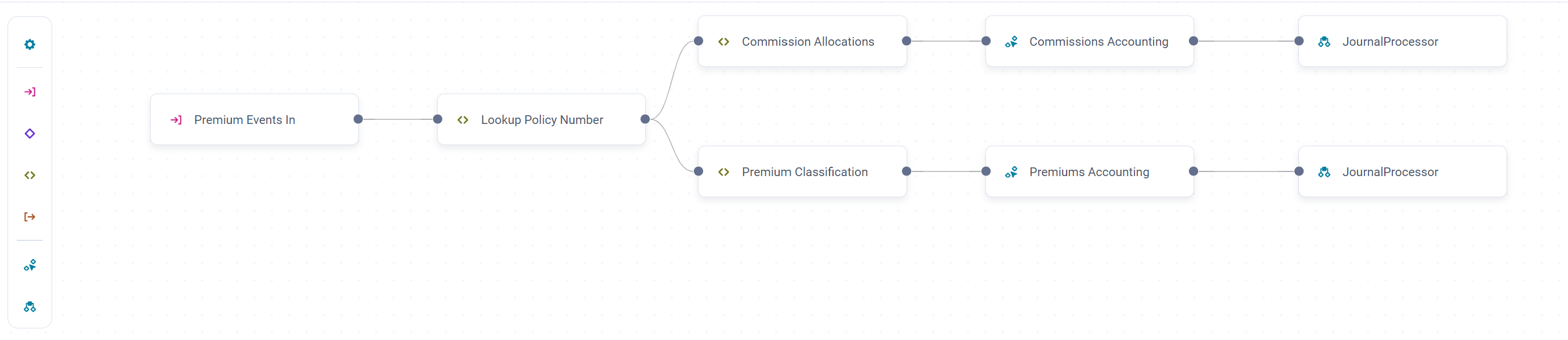
The sample below shows how a Flow would be represented in the Configuration Data JSON file:
Flow Configuration
Sample Configuration Data JSON file with Flow: