Journal Line Definition
Overview
This article provides information about Journal Line Definition.
What Is a Journal Line?
A Journal is a set of Debit records and Credit records sent to the Subledger. A Journal Line is a single Line within a Journal, i.e. a single Debit record or a single Credit record. Journal Line Definition defines the structure of a Journal Line.
If you have multiple source systems that produce journals, they must be standardized before they can be uploaded into the Subledger.
Field Types
Journal Line Definition comprises of fields of the following types:
- date
- text
- integer
- decimal - the decimal attribute operates with the following parameters: scale 18 digits and precision 3 digits. This format is hardcoded and cannot be changed.
- uuid
- amount - a specific type of decimal, that is used for financial amounts
A Journal Line Definition comprises of mandatory and additional fields. The number of mandatory fields is set, however, you can add as many additional fields as you require.
The fields within a Journal Line Definition can be divided into three categories:
- Systemic Fields
- Subledger Nodes
- Additional fields
Systemic Fields
Systemic Fields are a predefined set of mandatory hard-coded fields. Each of the Systemic Field Types have to be assigned a field. Once a field is assigned a Systemic Field Type it cannot be assigned a different Systemic Field Type. Also, Systemic Field Type cannot be used for a different field. E.g., if Posting Date is assigned *Core Date Field (*which is a Systemic Field Type), no other field can be assigned Core Date Field and no other Systemic Field Type can be assigned to the Posting Date. The only exception is the Subledger Node. For more details about Subledger Nodes, refer below.
The table below shows the list of all Systemic Field Types and data types that are valid for them:
If you have enabled support for multiple currencies, you will have additional mandatory Systemic Fields to configure: Functional Amount and Functional Currency. For more details on support for multiple currencies, refer to Multiple Currencies.
Subledger Nodes
Subledger Nodes are a type of Systemic Fields. They are mandatory fields, like other Systemic Field Types, however, you can create as many Subledger Nodes as you need. There has to be at least one. Subledger Nodes can only contain text values. Once the fields are created they have to be filled out.
A Subledger Node field cannot be assigned a different Systemic Field Type.
Additional Fields
The additional fields are non-mandatory fields created by the user.
A Journal Line Definition should contain all data that are required for segmenting balances and additionally any further data required for either operational, management, or regulatory reporting. It should also contain data that might be useful for troubleshooting and traceability, such as source system transaction ID. The defined Journal Line fields can be grouped into Dimension Sets which are used in processing for granulation of data, e.g. for balances.
Primary Key
You can select one or more fields to constitute the Primary Key, i.e. unique identifier that is used to identify unique records in Fynapse.
Journal ID Systemic Field constitutes the Primary Key for Journals. When you are creating a Journal Line Definition this field is marked as Unique ID by default. This setting cannot be changed.
Journal Line ID constitutes the Primary Key for Journal Lines. When you are creating a Journal Line Definition this field is marked as Unique ID by default. This setting cannot be changed. You can add more fields to constitute the Primary Key of Journal Lines. If you choose a field that is not mandatory by default, i.e. not a Systemic Field, such a field will become mandatory. This means they need to have data, otherwise the Journal will be rejected. To achieve that, fields that constitute the Primary Key for Journal Lines have to be mapped with fields in Business Event on the Journal Mapping screen.
Grouping
Journal Lines generated by the Accounting Engine are grouped within a Journal by Core Date, Subledger Node, and Accounting Basis.
This ensures that all Journal Lines in a Journal have:
- The same Accounting Basis
- The same Subledger Node
- The same Core Date
This prevents, e.g. reversing and permanent Journal Lines to be grouped within on Journal.
Journal Line Definition Example
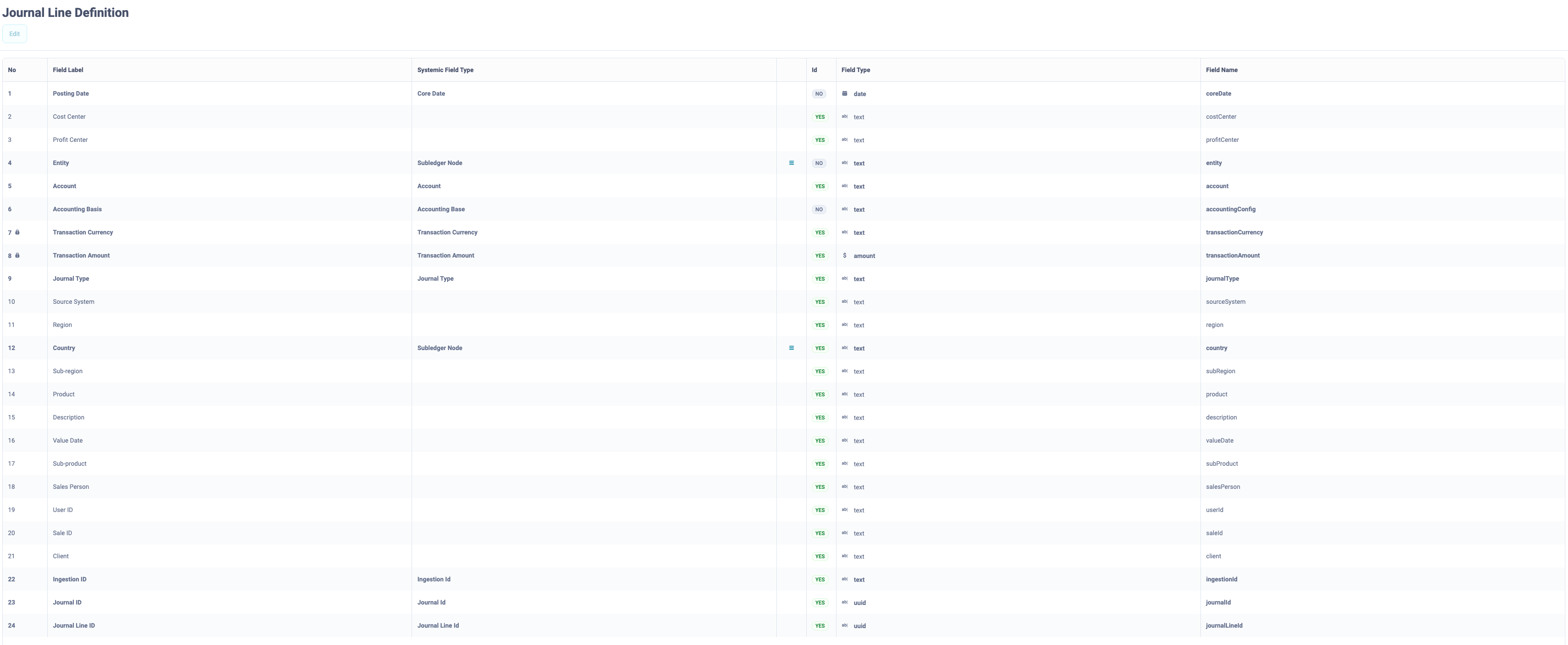
Journal Line example:
Legend:
- Field Label - the name of the field that will be visible in the screen.
- Systemic Field Type - Systemic Fields are a predefined set of mandatory hard-coded fields. Each of the Systemic Field Types have to be assigned a field. Once a field is assigned a Systemic Field Type it cannot be assigned a different Systemic Field Type.
- Id - the fields which constitute the Primary Key
- Field Type - the data type of the field
- Field Name - the technical name for the field, used in the header of the data ingestion file
How to Configure a Journal Line Definition?
The fields on Journal Line Definition have a maximum limit of 128 characters.
- Go to Configuration > Accounting Configuration > Journal Line Definition.
- Click the Add button. You can add obligatory and optional fields. The obligatory fields constitute Systemic Fields and Subledger Nodes (it is obligatory to have a minimum one Subledger Node). Optional fields are attributes configured by you. By default, when you click the Add button and a new record appears, the Systemic Field Type is left blank, i.e. is set to an optional attribute, and the Field Type is set to text.
- Add a Field Label for the new record. The system will automatically fill out the Field Name. You can type a Field Name different from the Field Label. Once you type a different Field Name and then change the Field Label, the Field Name will not change. However, if you add a mandatory Systemic Field Type, the Field Name will be set to a hardcoded value for this Systemic Field Type.
- Select the Systemic Field Type if you wish to configure a mandatory field or leave this field blank if you wish to configure an additional field.
If you select a mandatory Systemic Field Type, e.g. Core Date, the Field Type will be automatically set to the data type required for this Systemic Field, e.g. date for Core Date, and the Field Name will also be automatically set and will not be editable.
Once you configure a mandatory Systemic Field Type, it will no longer be available in the Systemic Field Type drop-down, to ensure the mandatory Systemic Fields are not duplicated.
Remember all Systemic Fields have to be configured.
- Select the fields which will constitute the Primary Key by switching the Id flag to “YES”.
Remember Journal Line ID and Journal ID are set as Primary Keys by default.
- A validation icon, in the form of a red x or a green tick sign, is available next to the Save icon, on the right-hand corner of the screen. Real-time validation of the Journal Line Definition configuration is provided. If you click the icon, it will show validation messages regarding your current configuration, red for warnings, and green for the correct configuration. Once all validation messages are green you can click the Save button, to save your Journal Line Definition. If you click the Save button before the validation icon is green, an error will be thrown and the Journal Line Definition will not be saved.
- A hamburger icon is available next to Subledger Node type attributes. If you click it, a pop-up window appears, which allows you to add a list of possible values for this attribute. The attributes can later be used in Node/Accounting Configuration when defining values for attributes for a particular Subledger Node. Each attribute you add has to be entered in a separate line.
Currently editing the Journal Line Definition is only possible via Configuration Data JSON file. For more details, refer to Configuration Data.

