Journals Overview
Overview
A Journal is a set of Debit records and Credit records, which are balanced and complete, such that they can be posted into the Subledger.
The Debit and Credit records which comprise a Journal are represented by Journal Lines. Each Journal consists of a minimum of 2 Journal Lines, one representing a Credit record and one representing a Debit record. This is dictated by the double-entry bookkeeping system the Subledger facilitates. However, a Journal may comprise of hundreds or even thousands of Journal Lines.
The structure of a Journal is determined by the Journal Line Definition.
Journals as Input and Output Data
Depending on the area of Fynapse, Journals can be viewed as output or input data.
Output
Journals are the output data of Accounting Engine processing. The Accounting Engine receives financial data in the form of Business Events, which are processed and the results are complete and balanced Journals that can be then sent to the Subledger.
Input
Journals are the input data for the Subledger. A Journal can either be an output from the Accounting Engine or a record input directly into Fynapse from an external system.
A Journal can be received by the Subledger only if it meets the following requirements:
- Has at least one CR entry
- Has at least one DR entry
- Has a non-zero value on each entry - this could be in a currency other than the transaction currency
- Has a posting date
- Has a full set of subledger dimensions assigned
Posted and Unposted Journals
Fynapse recognizes two types of Journals: Posted and Unposted.
A Posted Journal is a Journal that has been received by the Subledger. Posted Journals are stored in the Journals Entity. They can be extracted from Fynapse by configuring an extract.
When a Journal is posted to the Subledger, any accounts which that Journal impacts will have their balance updated for a particular date.
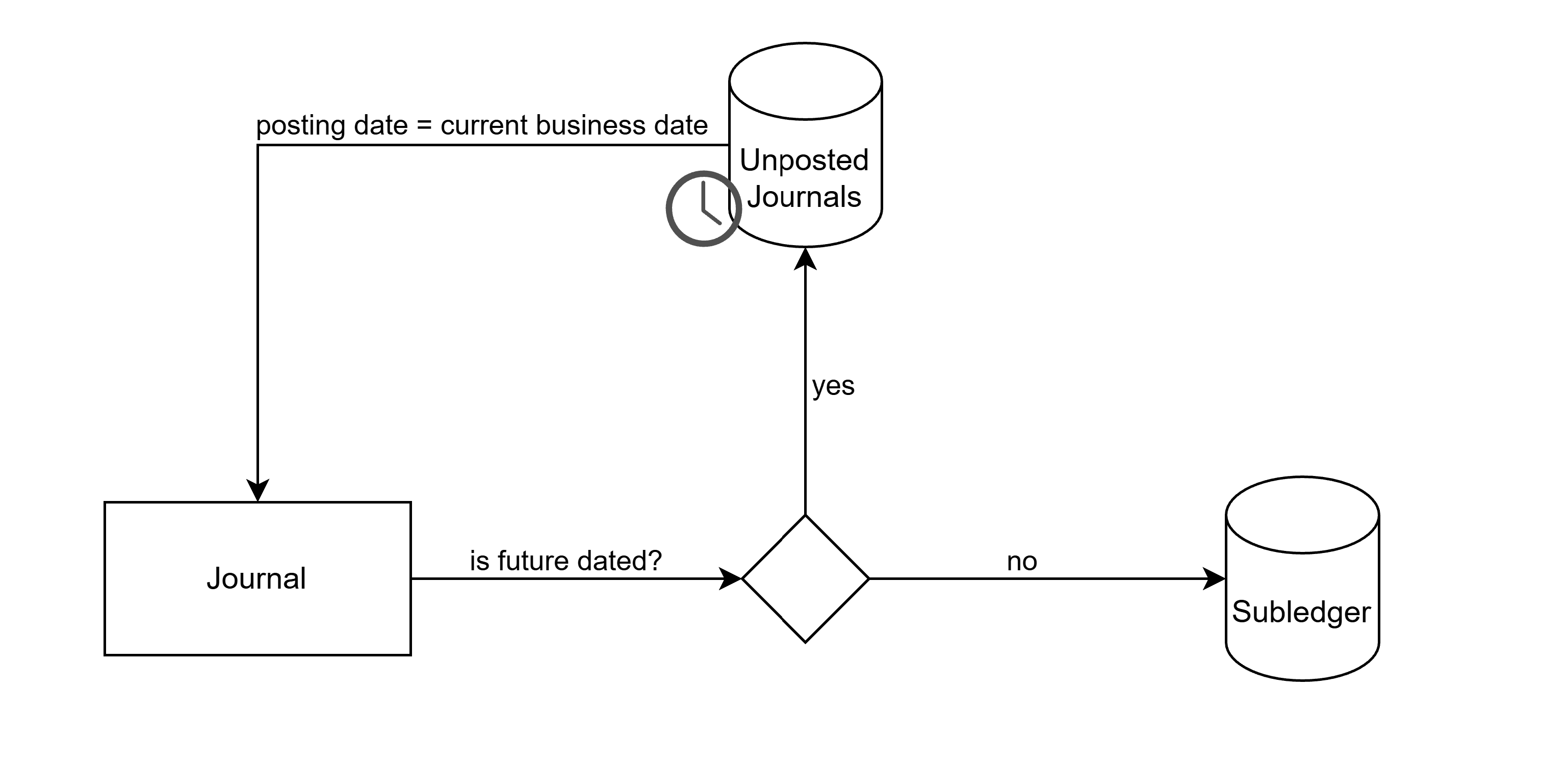
An Unposted Journal is a Journal with a future posting date, e.g., Journals for deferred payments. They are stored in the Unposted Journals Entity. Once their posting date arrives, they are posted and stored in the Journals Entity.
The Unposted Journal functionality can be managed, i.e. disabled or enabled, on the System Settings screen. By default the feature flag is enabled.
The diagram below illustrates the data flow:
Balancing Journals
A Journal must be balanced by:
- The Transaction Currency Field - the total amount of Debit records must equal the total amount of Credit records
- The Core Date Field
- The Accounting Config Field
- The Subledger Node
- The Transaction Currency - only when multiple currencies support is enabled, the total amount of Debit records must equal the total amount of Credit records
How do I know a Journal is balanced?
Balancing checks:
The Journal must balance (sum of Journal Amount = 0) by set of:
- Transaction Currency Field
- Core Date Field
- Accounting Config Field
Correct Journal Example (Balanced by Transaction Currency, Core Date, and Accounting Config):
Balance checks
For (24/11/2020, config1, PLN) sum of journals = 0
For (25/11/2020, config1, EUR) sum of journals = 0
Incorrect Journal Example (not Balanced):
Balance checks
For (24/11/2020, config1, PLN) sum of journals = 20
For (24/11/2020, config1, EUR) sum of journals = -20
For (25/11/2020, config1, PLN) sum of journals = -20
For (25/11/2020, config1, EUR) sum of journals = 20
Browsing Journals
The Journals screen, available in the Subledger tab, allows you to create a Journal Query to search for Journal Lines comprising a Journal. You can then browse the Journals, or drill-down to the Journal the lines comprise.
Unique ID
Each Journal is given a unique Journal ID. This ID is available on every Journal Line and can be used to reference back to the Journal.
Journal Line ID
Each Journal Line is given a unique ID.
Validations:
Fynapse performs the following validations on incoming Journals:
- Verifies that the Transaction amount is not “0” (zero)
- Verifies that mandatory fields are populated, i.e., Systemic Fields and Subledger Nodes
- Verifies that the data in the mandatory fields is in the correct format
- Verifies that a Journal is balanced
- For a package: verifies that all Journals are valid
If a Journal fails any of the validations, it is rejected and not posted to the Subledger.
Reversals
Reversing Journals are Journals that will be reversed on a specified date. Such a Journal consists of the original Journal posted on the Posting Date and its Reversal posted on a “reversing” date. The date on which a Reversal is posted can be configured individually per Journal Type.
The Reverses column on the Journals screen denotes whether a Journal is a Reversal. If a Journal Line is a Reversal, the column is populated with the Journal Line ID of a Journal Line being reversed.
For more details on Reversals, refer to Journal Types.

