Multiple Currencies Overview
Overview
This section provides information about support for multiple currencies.
The support for multiple currencies allows you to store Functional Amounts and Reporting Amounts in different currencies imported in Business Events or calculated based on the Transaction Amount.
What Are Transaction, Functional, and Reporting Currencies?
Transaction currency is the currency in which the real-life Business Event took place
- For example an invoice received from the supplier which was issued in CHF (swiss franc) or a EUR inflow on the company’s bank account.
Functional currency is the currency which is the base/main currency for a specific legal Entity. It is a currency which is used in the country in which a specific Legal Entity operates.
- For example, Aptitude Poland Software Sp. z o.o. will use PLN functional currency as it operates in Poland where PLN is the local currency.
Reporting currency is a currency which is used to prepare consolidated financial statements (for example Balance Sheet and Profit and Loss statement) and reports created on the mother company and intercompany levels.
- For example, one of the reporting currencies of Aptitude Poland Software Sp. z o.o. will be GBP as the headquarters of the Aptitude Software company are based in UK and GBP is the local currency of Aptitude Software Group PLC based in UK.
- Another reporting currency for Aptitude Poland Software Sp. z o.o. company will be USD as an Aptitude Software branch based in Boston in the USA will use a different Accounting Base (US GAAP instead of IFRS which will be used in UK and instead of Polish Accounting Act which will be used in Poland).
Example
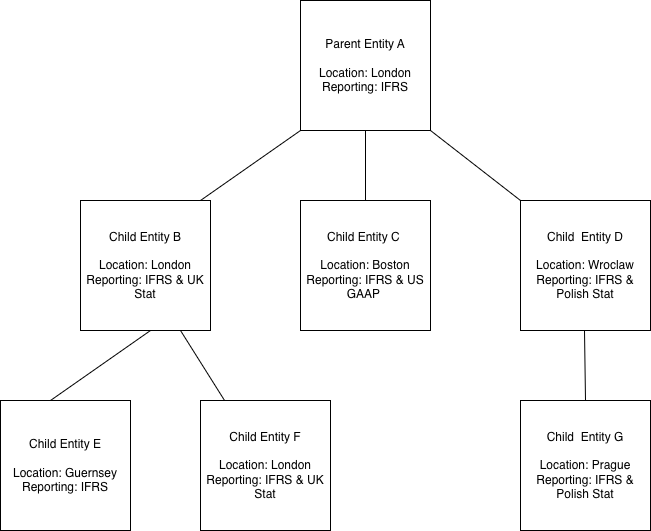
The diagram below shows a company structure where multiple reporting systems and multiple functional and reporting currencies are used:
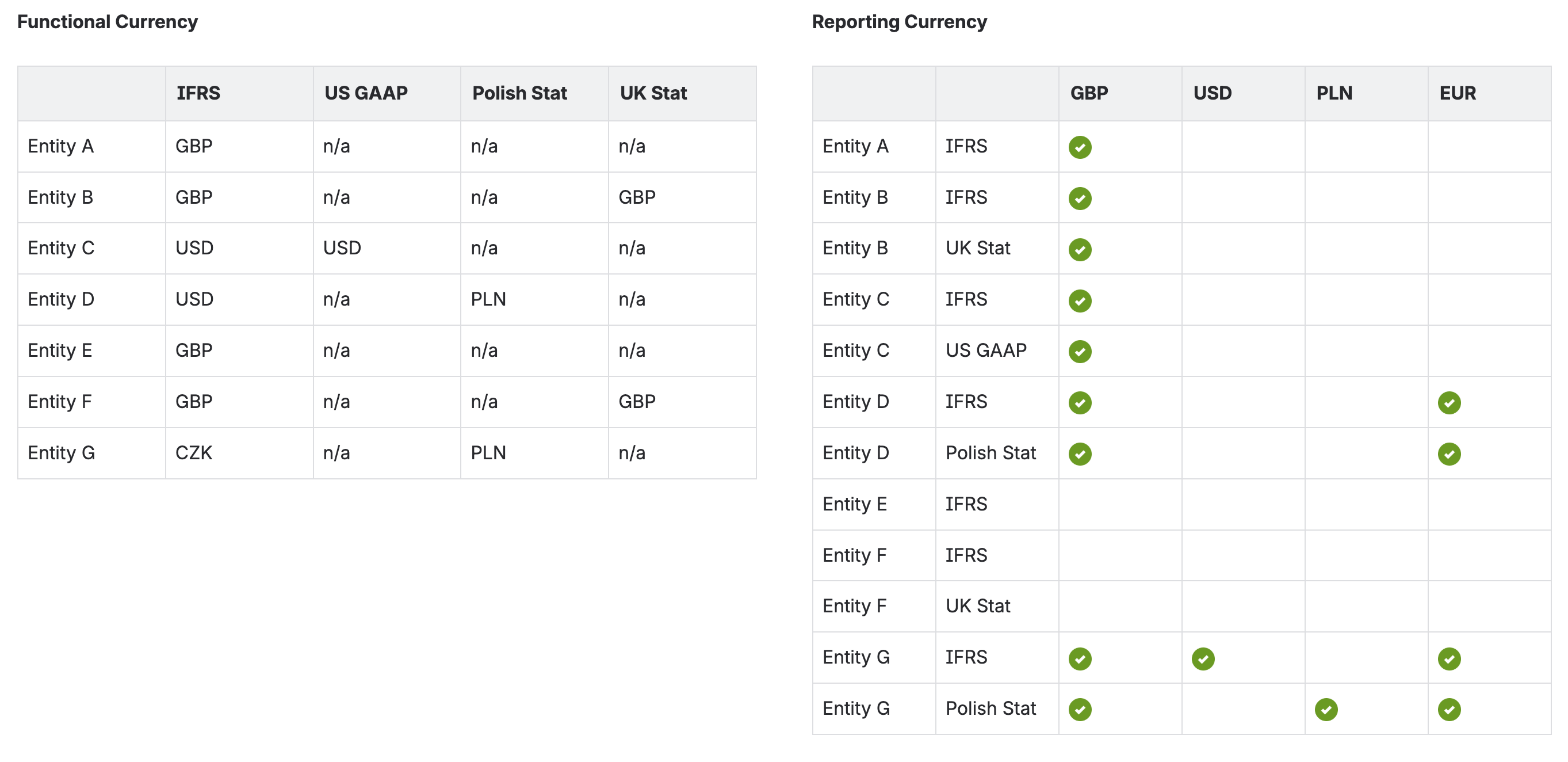
Using the above structure as a basis the currency requirements are as follows:
How Are Functional and Reporting Amounts Calculated?
Functional and Reporting Amounts can be:
- Provided on an imported Business Event
- Calculated in Fynapse:
- Functional Amount is always calculated from Transaction Amount
- Reporting Amount can be calculated from Transaction Amount or Functional Amount
The diagram below shows how Fynapse calculates Functional and Reporting amount when:
- Transaction Amount is the source for Functional Amount
- Functional Amount is the source for Reporting Amount

The Transaction Amount is provided with the Business Event. The exchange rates used for calculations are provided in the Exchange Rate Entity.
The Exchange Rate Entity is a reference data Entity, which contains the following properties:
- Source Currency which corresponds to the currency of the Transaction Amount or the currency of the Functional Amount, if Functional Amount is set as the source for Reporting Amount
- Target Currency which corresponds to the currency of the Functional Amount or Reporting Amount
- Date which corresponds to the Core Date
- Rate which is the exchange rate for a given Source Currency to Target Currency on a given Date
Based on these information Fynapse verifies 3 properties from the Business Event against the Exchange Rate Entity:
- Core Date to Date
- Transaction Currency or Functional Currency to Source Currency
- Functional Amount or Reporting Amount to Target Currency
Once these three are identified, i.e. Fynapse knows which exchange rate to apply to a given Transaction Amount\Functional Amount on a given Core Date, the Functional Amount or Reporting Amount is calculated.
Exchange Rate Precision Exchange rates are calculated using high precision. You can configure exchange rates with up to 20 digits before point and 18 digits after point, e.g. 23402307.48109348302. This facilitates grater precision in calculations for functional and reporting amounts. For example: USD to GBP exchange rate = 0.786834 GBP 100,000.00 = USD 127,091.67
The rounding for the exchange rate calculation has been implemented as follows:
- numbers 0-4 are rounded down
- numbers 5-9 are rounded up
on the digit after the decimal point determined by the minor unit of the given currency, for example for a currency with two minor units:
- 2.232 is rounded down to 2.23
- 2.457 is rounded up to 2.46
Any discrepancy between the amounts prior and post rounding will be resolved by adding the outstanding decimal amount to the rounded Journal with the highest absolute amount.
Conversion Modes
Fynapse supports three conversion modes:
- FX conversion, i.e. the conversion will always be performed, regardless of whether any values are provided from upstream systems
- Straight through processing, i.e. populate Journals with Functional and Reporting Amounts provided by upstream systems
- Prioritize values for Functional and Reporting Amounts from upstream systems, i.e. if a value is provided from an upstream system it is passed on to Journals, if no value is provided Fynapse performs the FX conversion
Example
This example shows calculations for Functional Amount. The calculations for Reporting Amounts use the same principles.

Example of rounding
This example shows rounding for Functional Amounts. The calculations for Reporting Amounts use the same rounding principles.
Imported Business Event
Generated Journals after rounding and before adjustment
Generated Journals after rounding and adjustment
Example of rounding 2
This example shows rounding for Functional and Reporting Amounts.
Imported Business Event
Currency details:
Reporting Amount is calculated based on the Functional Amount.
Generated Journals after rounding and before adjustment
Generated Journals after rounding and adjustment for functional amount
Generated Journals after rounding and adjustment for reporting amount

