Flow Overview
Overview
This section provides information about Flow, which allows you to create custom processing within Fynapse framework.
Fynapse Flow allows you to compose your own integrated Fynapse processes, i.e. Flows, comprising of lookups, calculation rules, native Fynapse processes such as the Accounting Engine processing and Journal processing, etc.
By creating process Flows that combine native Fynapse services with configurable or custom rules, you can configure the Fynapse platform to meet the specific finance automation and data consumption needs of your organization with the fastest possible time-to-value.
How Does It Work?
A Fynapse Flow is a scalable process flow.
- Each Flow is comprised of a series of user-defined processing “steps”
- The steps are chained together via a visual flow diagram that has a defined start and an end
- Each step performs some form of data processing or performs some logic that determines the next action in the Flow
Sample Flow

This flow has five steps, which in this case have been arranged to run one after the other (visualized through the links with arrows):
- Input: Denotes the start of Flow processing. Defines a Transactional Data Entity (TDE) to be processed by Flow. Typically the TDE data is sourced from the Inbound CSV file that is submitted to Fynapse. Assuming that a flat TDE is used then every row from a CSV file will be read and then subsequently processed by Flow. The record produced by Input step is made available for all the remaining steps in the rule to use.
- Script step (enrichment lookup): A user-configured script step using Python rules to perform lookup - matching some attributes from the input record with records in a Reference Data Entity to extract another value from the matched Reference Data record. The value may be used in future processing steps.
- Script step: A user-configured script step using Python rules to perform different operations on data, e.g. allocations, deferrals, etc.
- Accounting Engine: The Business Event, which has now been enriched with a lookup value (from step 2) and a calculation value (from step 3), is passed into the Accounting Engine to generate Journals.
- Journal Processing: Fynapse Journal processing, preparing Journals for extraction to the General Ledger.
Processing Fundamentals
Flow uses parallel processing to generate results as quickly and efficiently as possible. When a set of input records arrives for processing through a Flow, Fynapse starts up many instances of the Flow to process many records in parallel. As a consequence of this efficient processing, the input records are not guaranteed to be processed sequentially and output records are not guaranteed to be generated in any particular order.
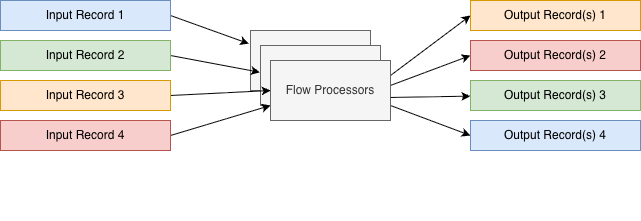
Likewise, the steps of each Flow are only guaranteed to be processed sequentially whenever the Flow graph has a link between them denoting that there is a dependency between these steps.
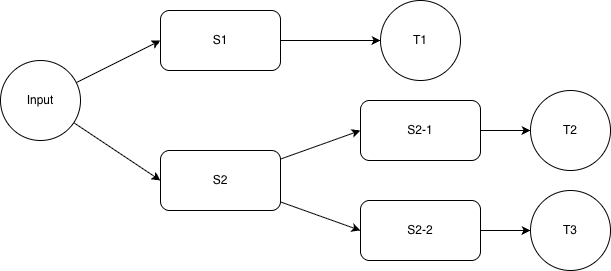
Whenever there is a step that is followed by multiple subsequent steps there is no guarantee which successor step will be executed first. Any branch taken during execution needs to be completed first.
Below is the list of all possible execution orders:
- (a) Input → S1 → T1
- (b) Input → S2
- (c) → S2-1 → T2
- (d) → S2-2 → T3
In this case we have 4 possible execution orders:
- a b c d
- a b d c
- b c d a
- b d c a
Multiple Flows Working on the Same Input
It is possible to configure multiple flows that operate on the same input (the same Transaction Data Entity). When this happens, the steps from all the flows that operate on the same input will be combined, following the principles described above.
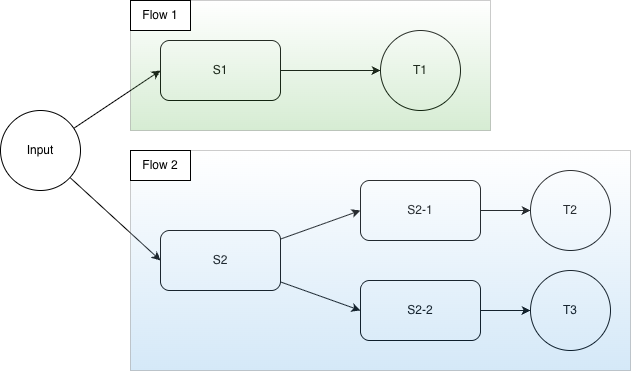
Input Record Persistence
Once all Flow executions for a given Input record are completed the Input is then sent to Finance Data Service.
If Finance Data Service is persisted for a given Input Data Entity then it will be stored in a database and available for querying.
Target Records Tracing
All target records are stamped with the original Ingestion Id of the input record. This can be used to trace back the original ingestion from the resulting Flow outputs (including Journals).
Errors and Reprocessing
If there is an error reported during Flow Processing, then no target is populated with data and the original Input record is sent to the Error Management.
This can be caused by various errors listed in the Consolidated Error List.
Whenever a record is sent for reprocessing it will be processed by the latest published version of the Flow, which means that previously reported errors can be fixed by adjusting the Flow definition (where appropriate).
Flow processing is successful whenever all of the targets (including Accounting Engine) are populated by the data created from input record. If an error occurs during processing of the Business Event generated by Flow, then the Business Event is sent to Error Management, where it can be reprocessed.
Input
The input into a Flow can be:
- A Transaction Data Entity
- A Reference Data Entity
- A transient Entity
defined in the Input step.
Transaction Data and Reference Data Entities are Defined Entities, with a structure consisting of attributes, with Transaction Data Entities being similar to Business Event Entity or Journals Entity and Reference Data Entities comprising of reference data used for enrichment and validations.
Transient Entities, are Entities created by an extract. They can be both Transaction Data and Reference Data Entities. For more details, refer to Extract Configuration.
If you want to use an Entity with data from an extract as input for Flow, please remember that if you run the extract before the Flow is up and running, the data that would be exported to the Entity before the Flow is ready will not be processed.
This is especially important if you want to use the scheduler feature. Remember to schedule the date for the first extract after you know the Flow will be ready.
We recommend the following steps:
- Define the extract. It is key to do this first especially if you want to create a transient Entity (see below), as they will not be available in the Input step otherwise.
If you are using the scheduler, remember to schedule the date of the first extract after the Flow is up and running.
- Define your Flow.
- Run the first extract.
If you did run an extract before the Flow was ready, you can still process the already extracted data by re-running the extract on the Extraction Logs screen.
Also if a Flow is incorrect and an extract is run, but due to errors in Flow all data is errored, you can fix the Flow and re-run the extract.
Because each extract creates a set of data, re-running the extract will create duplicates of records.
To handle these duplicated records, we have extractId.
The extractId consists of ex_<extract_log_uuid>_<rerun_number>. It is added to all transient Entities. For Transaction type transient Entities it ensures correct deduplication of data. For Reference type transaction Entities it is ignored as reference data are not deduplicated.
In Transaction type transient Entities, the extractId is added to the Primary Key. Moreover, the Primary Key of Transaction type transient Entities consists of:
- The Primary Key of the source Entity plus extractId if no aggregation is set
- The aggregation criteria plus extractId if aggregation is set For user-configured Transaction Entities, you have to add the extractId to the Entity Primary Key. If you do not add the extractId the data will be deduplicated based on the other properties set in the Primary Key without differentiation for the extract run. For user-configured Reference Entities, we recommend not to add extractId as this will cause multiplication of records due to different extractIds.
Extract only incremental data is always set by default to avoid exponential increase of extracted data, as only increments are extracted after initial extract to avoid duplication of records.
It is set by default for all extracts apart from Balances.
You need to define at least one input Entity to be able to create a Flow. For more details about Entity limits, refer to Data Structure.
Below is a sample structure of a Transaction Data Entity:
Sample Transaction Data Entity
As you can see from the beginning of the definition:
the Transaction Data Entities are configured in the “entities” section of the Configuration Data JSON file, alongside other Defined Entities from the Data Structure. To configure a Transaction Data correctly, you need to ensure the properties are defined as follows:
- namespace - fynapse
- name - ensure you select a meaningful name that will allow you to easily identify the Transaction Data Entity
- temporalityType - what kind of data are contained in this Entity; for Transaction Data Entities this property has to be defined as “Transaction”
- description - optional, you can add an informative description for your Transaction Data Entity
- type - determines what type of an Entity this is; for Transaction Data Entities this property has to be defined as “DefinedEntity”
- attributes - in this section you will define the attributes for your Entity. For more information about types of attributes, refer to Data Structure Definition.
To learn about Reference Data Entities, refer to Data Structure.
Currently, Transaction Data and Reference Data Entities can only be defined in a JSON file. You can do it either in the Configuration Data JSON file with the entire configuration or separately in the Data Structure Definition JSON file.
Hierarchical Data in Flow
It is possible to process hierarchical data even if the data is submitted via CSV file. In this scenario, the Transaction Data Entity must have a single list attribute defined and a Primary Key on a root level.
Example Entity Definition:
Sample Entity Definition with a List
With the Entity defined as above, the below CSV file can be submitted:
Sample CSV File
For the above data Fynapse will create two records. If the aggregation of CSV rows is to be performed for multiple lines in the input CSV file, the lines need to be ordered by the value of the Primary Key attributes. Fynapse will emit a new record after it detects a change of these values.
This will create two instances of the InputWithList Transaction Data Entities that will have the following values:
Data available on a Flow Input step for the Sample CSV file
First record:
Second record:
The feature to aggregate multiple rows into a single input record was not designed for very large numbers of rows to be aggregated. Specifically it is not recommended to model the input files as a single record to be then processed by Fynapse as it invalidates the scalability and performance benefit of the underlying Fynapse platform.
Following the example above, let’s assume we want to define a step that sums up a calculation - value1 * value2 - from each record in the hierarchy. To achieve this, we can use a script block with the following Python script:
Output
A Flow can have two types of output:
- For Flows ending in the Journal Processor step, the output is a Journal
- For Flows ending in a Target step, the output is a transaction record stored in a Transaction Data Entity. This output can be later used as a source for an Input step in a different Flow.
Best Practices for Authoring Flows
Following is a list of best practices to author Flows:
- Break down Python scripts into multiple steps, if possible, and use variables to push the results between them. If there is an error during the processing of a Flow, the error message will include the Flow name, version and the step name where the error occurred.
- Document and comment your Python code. Make sure that any assumptions made when developing the Python code are properly documented as comments in the Scripts.
- Validate inputs. Any critical value needs to be inspected whether it is within the expected value range (e.g. value is not empty). If possible, the validations should be the first steps in the Flow.
- Clear error reporting. Make sure that the errors reported by Flow are sufficient enough to fix the data error, if needed. Include all the necessary information that would allow to easily identify the root cause of the problem.

