Mapping
Mapping Posting Components to Business Event Types
Each Posting Component can be mapped to a single or multiple Business Event Types. The Posting Components mapped to each Business Event Type indicate which debit or credit entries to create for the given Business Event, based on the defined Posting Patterns.
Conversely, each Business Event Type can have multiple Posting Components mapped to it.
Matching Criteria
Matching criteria allow you to determine based on which attributes a Business Event Type is matched with a Posting Component.
Specific Matching Values
The following options allow you to specify matching criteria for values from an inbound Business Event and defined mapping:
- ANY - any value
- IN - is included in the value
- NOT IN - is not included in the value
- EMPTY - no value specified (i.e. if the field is empty, trigger this posting component)
Mapping Posting Patterns
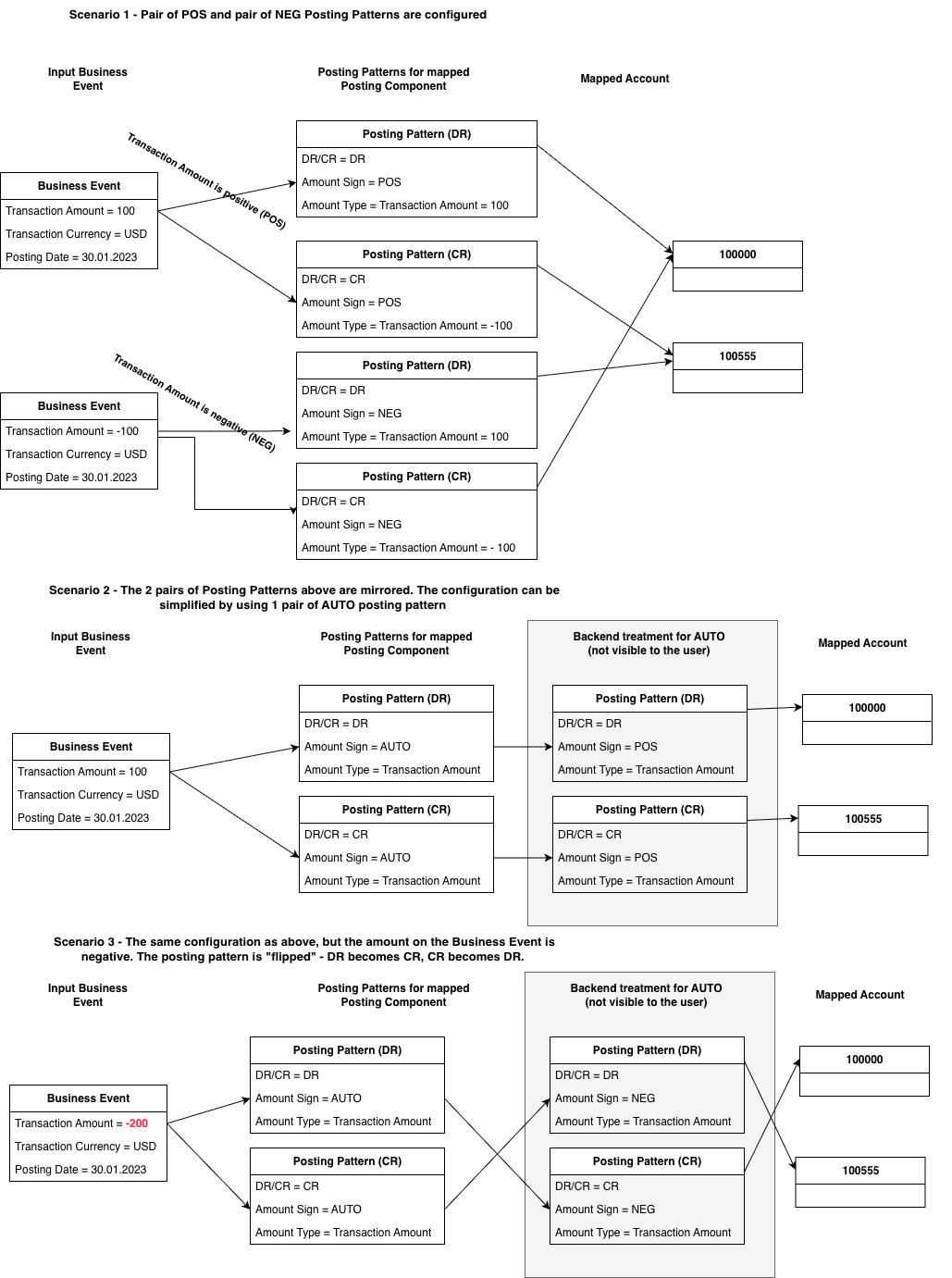
A Business Event type is matched with a Posting Component. Each Posting Component has at least one Posting Pattern defined, which contains the Amount Sign flag. Based on the flag a Business Event Type is matched with the proper type of debit or credit Posting Pattern and then assigned to a a Posting Code.
By default the information if a record is a debit or a credit is not explicitly visible on a Journal Line generated by the Accounting Engine. You expose the information to be visible on the Journal Line by creating a mapping to the DR/CR Indicator Derived attribute. For more details on mapping Journals, refer to Journal Mapping.
Amount Sign flag values:
- POS - maps Business Event with positive amount to the Posting Pattern with POS Amount Sign
- NEG - maps Business Event with negative amount to the Posting Pattern with NEG Amount Sign
- AUTO - will work for both positive and negative amounts, based on the sign for positive amount it posts the records as is and for negative amount it reverses the debit and credit records
How are the amounts processed, based on the type of record:
- If a record is a debit (DR) type record, the absolute value for the Business Event Type Amount field value will be the sign of the output Amount value
- If a record is a credit (CR) type record, the absolute value for the Business Event Type Amount field value *-1 will be the sign of the output Amount value
Account Lookups
Once a Business Event is matched with a Posting Component, it has to be assigned an Account. Only one Account can be assigned per one debit or credit entry.
The Accounts are matched to entries based on a defined list of matching criteria. These criteria can be the same as matching criteria for mapping Business Event Types to Posting Components or you can create new ones, or a mix of new and already defined criteria.
The following options allow you to specify matching criteria for values:
- IN - forces exact matching of an entries’ attributes with the defined criteria
- ANY - wildcard, matches all attributes of an entry that were not matched by IN criterion
- EMPTY - no value specified (i.e. if the field is empty, assign to this account)
If more than one criterion is defined, the one with IN option takes precedence, as it is more exact than one with ANY option.

