Statistics via API

A guide on how to retrieve metrics via API

Overview

Fynapse allows you to gather different metrics using REST API endpoints.

Retrieving Metrics Using REST API

This section covers the steps required to retrieve statistical metrics using REST API.
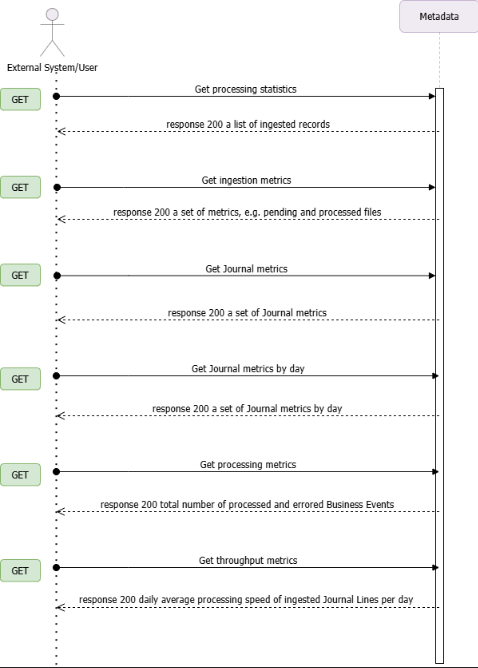
Statistics via API

Statistics REST API Endpoints

Get Processing Statistics

Allows you to retrieve current processing status of ingested data.

Example

GET
/api/v1/namespaces
1curl https://api.fynapse.com/api/v1/namespaces \
2 -H "Authorization: Bearer <token>"
Response
1{
2 "data": [
3 {
4 "name": "fynapse"
5 },
6 {
7 "name": "custom-namespace"
8 }
9 ]
10}

Get Ingestion Metrics

Allows you to retrieve information about ingestions, both API-sourced and from ingestion files, in a defined period.

Example

GET
/api/v1/statistics/operational-dashboard/ingestion-metrics
1curl -G https://api.fynapse.com/api/v1/statistics/operational-dashboard/ingestion-metrics \
2 -H "Authorization: Bearer <token>" \
3 -d from=from \
4 -d to=to
Response
1{
2 "pendingFiles": 5,
3 "processedFiles": 20,
4 "referenceFiles": 10,
5 "apiCalls": 15,
6 "erroredFiles": 2
7}

Get Journal Metrics

Allows you to retrieve information about the status of ingested Journals in a defined period.

Example

GET
/api/v1/statistics/operational-dashboard/journal-metrics
1curl -G https://api.fynapse.com/api/v1/statistics/operational-dashboard/journal-metrics \
2 -H "Authorization: Bearer <token>" \
3 -d from=from \
4 -d to=to
Response
1{
2 "awaitingApproval": 4,
3 "deniedApproval": 1,
4 "postedJournals": 10,
5 "unpostedJournals": 3,
6 "totalJournalLines": 150,
7 "errors": 5
8}

Get Journal Metrics by Day

Allows you to retrieve information about the status of ingested Journals per day.

Example

GET
/api/v1/statistics/operational-dashboard/journal-metrics-by-day
1curl -G https://api.fynapse.com/api/v1/statistics/operational-dashboard/journal-metrics-by-day \
2 -H "Authorization: Bearer <token>" \
3 -H "Content-Type: application/json" \
4 -d from=2024-05-01 \
5 -d to=2024-05-02 \
6 -d nodes=node-123 \
7 -d nodes=node-456
Response
1[
2 {
3 "day": "2024-05-01",
4 "postedJournals": 3,
5 "unpostedJournals": 1,
6 "totalJournalLines": 50,
7 "errors": 2
8 },
9 {
10 "day": "2024-05-02",
11 "postedJournals": 4,
12 "unpostedJournals": 1,
13 "totalJournalLines": 60,
14 "errors": 1
15 }
16]

Get Processing Metrics

Allows you to retrieve information about Business Event processing metrics and the total number of records generated by a Flow.

Example

GET
/api/v1/statistics/operational-dashboard/processing-metrics
1curl -G https://api.fynapse.com/api/v1/statistics/operational-dashboard/processing-metrics \
2 -H "Authorization: Bearer <token>" \
3 -d from=from \
4 -d to=to
Response
1{
2 "errors": 7,
3 "businessEvents": 100,
4 "flowTriggersTotal": 150,
5 "flowTriggersByEntity": "string"
6}

Get Throughput Metrics

Allows you to retrieve information about the daily average processing speed of ingested Journal Lines per day.

Example

GET
/api/v1/statistics/operational-dashboard/throughput-metrics
1curl -G https://api.fynapse.com/api/v1/statistics/operational-dashboard/throughput-metrics \
2 -H "Authorization: Bearer <token>" \
3 -H "Content-Type: application/json" \
4 -d from=2023-01-01 \
5 -d to=2023-01-31
Response
1[
2 {
3 "day": "2023-01-15",
4 "completedIngests": 45,
5 "journalLines": 13500,
6 "processingTimeSeconds": 10800,
7 "avgJournalLinesPerHour": 1125
8 }
9]