Data Ingestion via API
Overview
There are two types of data you can ingest into Fynapse:
- financial data, such as Business Events and Journals
- reference and transaction data
To learn what happens to the data after ingestion, refer to Finance Data Service.
Ingesting Data Using REST API
This section covers the steps required to ingest data into Fynapse using REST API.
Processing Diagram
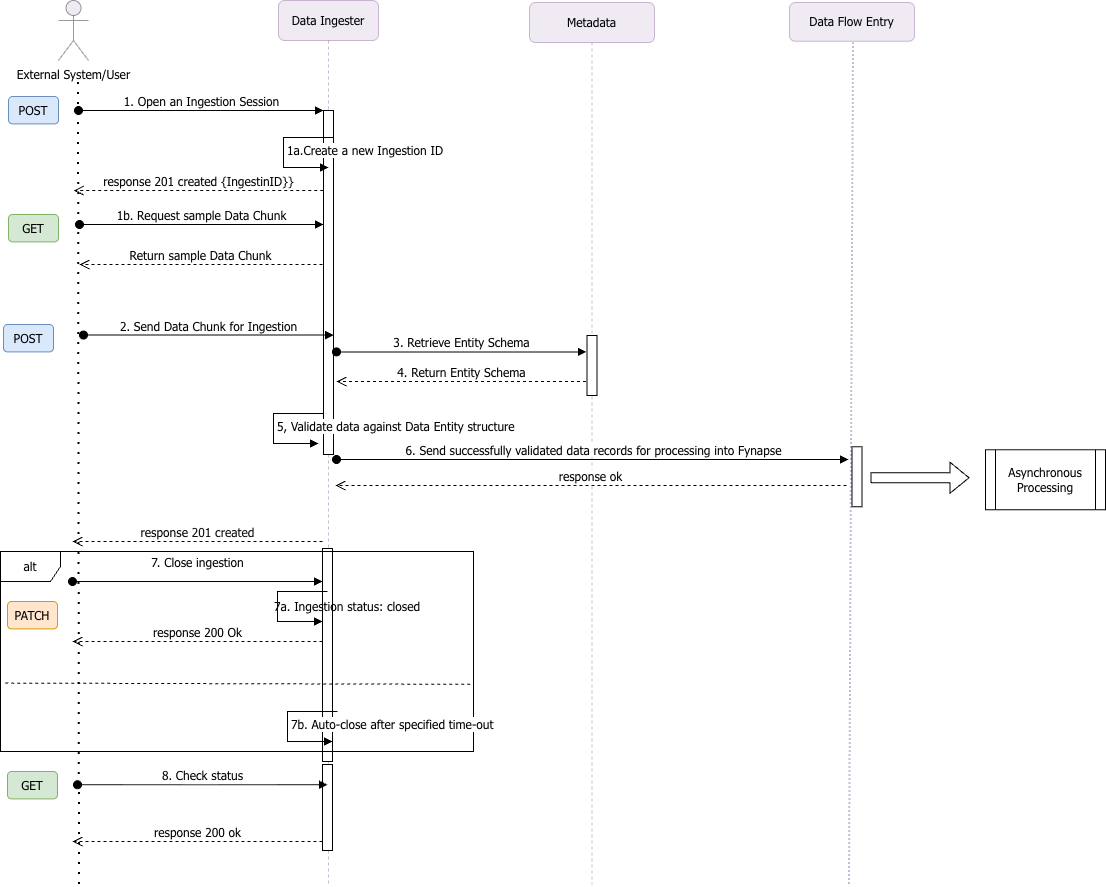
The diagram below illustrates the flow of API calls during ingestion:
Example
This example refers to numbered steps on the diagram above.
Opening an Ingestion Session
When you want to ingest data using REST API you have to open an ingestion session (1) and generate an Ingestion ID (1a) using the Create an Ingestion endpoint:
This endpoint initializes an ingestion session and generates a unique identifier, ingestionId, based on a specified ‘namespace’ and ‘entity’. The created ingestion will have a ‘pending’ status. Once the ingestion session is initialized, it will allow concurrent requests to the /ingestion/{ingestionId} endpoint. The sessions will automatically expire after a period of inactivity. By default, session timeout is set to 15 minutes. This can be changed in the request body, if required.
During the duration of a session, you can ingest data divided into chunks (2), i.e. files in JSON format up to 1MB each, into one Entity using the Create Entity data endpoint. Each ingestion session has an Ingestion ID, created in the previous step, which will be assigned to all records ingested across all chunks in a given session.
If you are not sure how the data chunk should be defined, you can download a sample using the Generates an example of a valid request to upload data for a given Entity and Namespace endpoint (1b).
Create Entity Data
The Create Entity data endpoint creates one or multiple records for a given ‘ingestionId’ to be ingested to an Entity. After the data chunk is sent to Fynapse, the Data Ingester retrieves the structure of the given Entity from the Metadata (3). Based on the returned structure (4), the data undergoes structural validation (5) to ensure their structure is correct, i.e. all mandatory fields have data, the data is of a correct type, etc. Once successfully validated, the data is sent to Fynapse (6).
The response is synchronous and returns a 201 status once the data is successfully processed. Any validation or conversion errors are returned with the failed data in the response body. If the ingestion session is already closed (7b), then the request will be rejected with the 409 status. If the ingestion session was manually closed during data upload (7a), the data submitted in the request will still be processed, but no new data will be ingested.
Sample chunk with data to be ingested using a Transaction Entity:
There is no limit on the number of chunks you can ingest per session.
Managing an Ingestion Session
You can manually force an ingestion session to close before the set session timeout (7) by using the Change ingestion session status endpoint:
This endpoint allows you to change the status of an ingestion session from ‘pending’ to ‘closed’. When a session is closed manually using this endpoint, any data undergoing processing will be processed. No new requests for processing data will be submitted.
You can also check the status of the session (8) using the Check the status of an ingestion endpoint.
Statistics
Additionally, you can retrieve different statistics regarding, inter alia, ingestion using statistics endpoints.
For more details, refer to Statistics via API.

