Data Extraction via API

How to extract data with the Fynapse REST API

Overview

You can extract the following types of data from Fynapse:

  • Journals, both Posted and Unposted
  • Processing Errors
  • Reference and transaction data from the Finance Data Service

Extracting Data Using REST API

This section covers the steps required to extract data from Fynapse using REST API.

Processing Diagram

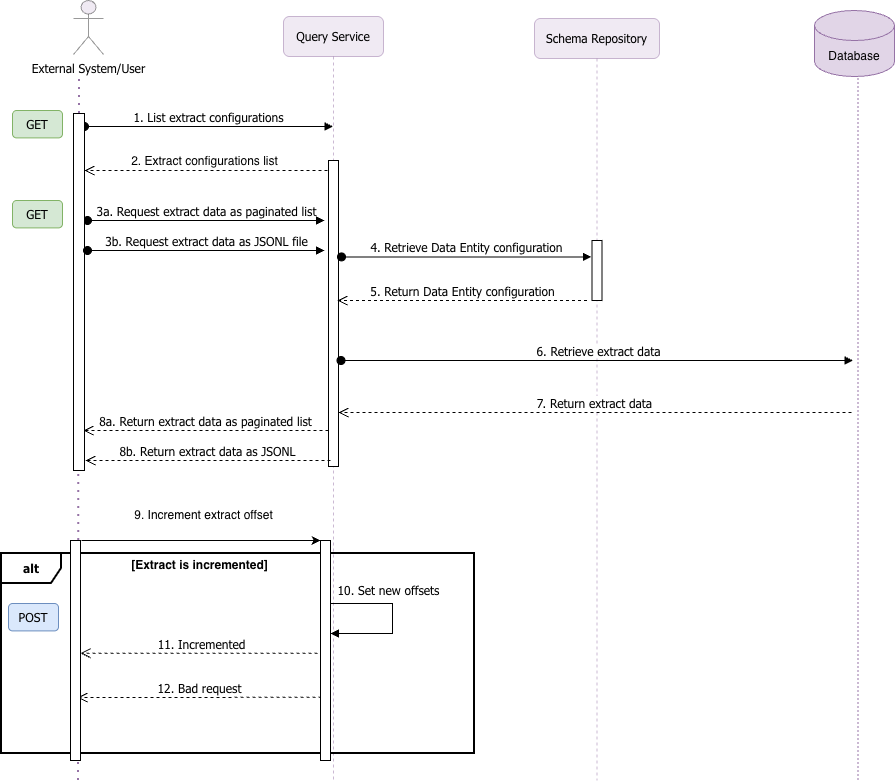
The diagram below illustrates the flow of API calls during extraction:
DataExtractionAPI.drawio

Example

This example refers to numbered steps on the diagram above.

Obtaining the List of Available Extraction Configurations

To extract data using REST API, first you need to obtain a list of all active extract configurations, using the Get all active extract configurations endpoint (1). The response to a successful call is a list of all extract configurations defined in Fynapse (2):

GET
/api/v1/extraction-configurations
1import requests
2
3url = "https://api.fynapse.com/api/v1/extraction-configurations"
4
5payload = {}
6headers = {
7 "Authorization": "Bearer <token>",
8 "Content-Type": "application/json"
9}
10
11response = requests.get(url, json=payload, headers=headers)
12
13print(response.json())

You can omit this step if you have the ID of the extract configuration you want to use.

Data Extraction

Once you have a list of extract configuration you can choose which one you want to use to extract data from Fynapse. The extract is comprised of data which meet the criteria listed in the given extract configuration.

You can extract the data identified for a given extract configuration either in a paginated format, using the Get data by extractionConfigId endpoint (3a), or as a JSONL file (3b), using the Get data by extractionConfigId as JSONL file endpoint.

GET
/api/v1/extraction-configurations/:extractionConfigId/extractions/paginated
1import requests
2
3url = "https://api.fynapse.com/api/v1/extraction-configurations/extractionConfigId/extractions/paginated"
4
5querystring = {"page":"0","limit":"10"}
6
7payload = {
8 "extractionConfigId": "d4f1a9b2-3c7e-4f8a-9b1e-2a7f5c6d8e9f",
9 "page": 1,
10 "limit": 100
11}
12headers = {
13 "Authorization": "Bearer <token>",
14 "Content-Type": "application/json"
15}
16
17response = requests.get(url, json=payload, headers=headers, params=querystring)
18
19print(response.json())

Example of paginated data:

Response
1{
2 "data": [
3 {
4 "transactionId": "TXN123456789",
5 "accountNumber": "ACC987654321",
6 "amount": "1500.00",
7 "currency": "USD",
8 "transactionDate": "2024-06-01T10:15:30Z",
9 "status": "Completed"
10 },
11 {
12 "transactionId": "TXN123456790",
13 "accountNumber": "ACC987654322",
14 "amount": "250.75",
15 "currency": "USD",
16 "transactionDate": "2024-06-01T11:20:45Z",
17 "status": "Pending"
18 }
19 ],
20 "pageNo": 1,
21 "journalSummaryId": "a1b2c3d4-e5f6-7890-abcd-ef1234567890",
22 "next": "/api/v1/extraction-configurations/d4f1a9b2-3c7e-4f8a-9b1e-2a7f5c6d8e9f/extractions/paginated?page=2&limit=100",
23 "prev": ""
24}

You can also choose to extract only the increment of data you already extracted (9), by using the Increments the saved offsets for an incremental extract endpoint, which moves the last offset forward to return only newly added data on the next data retrieval.

POST
/api/v1/extraction-configurations/:extractionConfigId/extractions/increment
1import requests
2
3url = "https://api.fynapse.com/api/v1/extraction-configurations/extractionConfigId/extractions/increment"
4
5headers = {"Authorization": "Bearer <token>"}
6
7response = requests.post(url, headers=headers)
8
9print(response.json())