

Trigger Asynchronous Data Extraction via API
You can trigger data extraction asynchronously and gather metadata for executed extractions using REST API endpoints.
Process Diagram
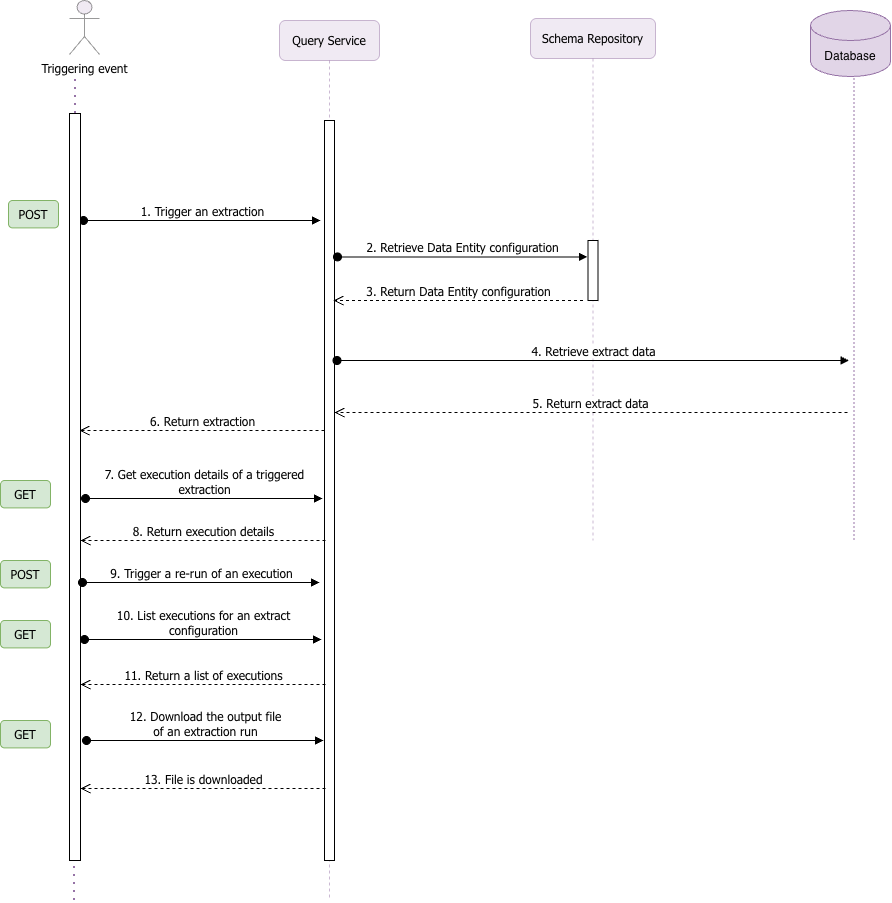
Asynchronous extraction allows you to trigger an execution of an extraction using the Trigger an Extraction (1) endpoint. Such extraction is triggered based of the extractionConfigId parameter. Only submitted extracts, i.e. extracts which don’t have a DRAFT status and have not yet reached their end date can be triggered using this endpoint.
If an extract has the Split by option configured, the output will be divided based on the attribute selected to split the data. You can retrieve the status for one of the split extracts by using the Get the status of one sub-extract of an execution endpoint. For non-split extracts this endpoint will return the status of the entire extract.
Additionally, you can:
List executions for a given extract configuration using the List executions for an Extract Configuration endpoint (10), this list will include re-runs of the execution:
Query execution metadata for a given extraction, including execution history with re-runs and latest status, by using the Get execution details of a triggered extraction endpoint (7):
Trigger a re-run of the latest execution of an extraction by using the Trigger a rerun of an execution endpoint (9). The execution must be in a re-runnable state, i.e. Completed or Failed status, and not e.g. Completed (no data), On hold, etc.
Download the file with the result of an extraction by using the Download the output file of an extraction run endpoint (12). Only results from extracts which send their output to Cloud Storage can be downloaded. For extracts with Split by option configured you can download only one of the split extracts using the Download the output file of one run of a sub-extract endpoint.