API Authentication
Authenticate API requests to the Fynapse API.
Overview
This article provides information on the authentication process for API calls.
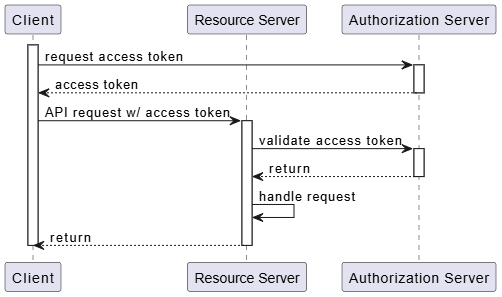
Each API request made to Fynapse has to be authenticated. Fynapse uses OAuth2 Client Credentials authorization.
The Client Credentials Flow authorization occurs when an application exchanges its application credentials, such as client ID and client secret, for an access token from Fynapse.
How to Generate Client ID and Client Secret Parameters?
- Go to User Account.
- In the API client section, click the Generate button. Client ID and Client secret will be generated. Make sure to copy the Client secret to your new API key, as you will not be able to see it again.
- Close the User Account window.
The diagram below shows the process of authenticating client credentials using a token:
Requesting Access Token
The access token can be obtained by sending a request to:
https://<instance-url>/auth/token
providing the client id and secret as parameters.
Example request and response below:
Response
Session Timeout
By default, the sessions timeout occurs after 5 minutes of inactivity.

